Banana Browser is a mobile web browser crafted to offer a superior browsing experience with its built-in ad-blocking and security features. It focuses on enhancing user privacy by effectively blocking intrusive ads and trackers, which in turn, speeds up your browsing sessions. With its user-friendly navigation and customizable settings, Banana Browser stands out as an excellent choice for those who value a secure and ad-free internet journey.
Features of Banana Browser: Adblock, Secur:
⭐ Adblock: Experience a seamless and uninterrupted browsing journey with Banana Browser's built-in ad blocker, which keeps those pesky and intrusive ads at bay.
⭐ Secure DNS Bypass on HTTP(S): Enhance your privacy and security with the secure DNS bypass feature, designed to help you navigate the web without the discomfort of HTTP/HTTPS blocking.
⭐ Secure Login: Say goodbye to the hassle of remembering passwords. With Banana Browser's secure login feature, you can log in effortlessly and securely, thanks to encrypted account information.
⭐ Dark Mode: With just a click, switch to a soothing dark theme to lessen eye strain and fatigue, making it perfect for your late-night browsing sessions.
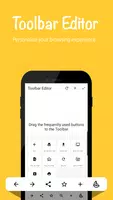
⭐ Toolbar Editor: Tailor your toolbar to your liking with customizable options like bookmarks, back button, add tabs, refresh, and dark mode, ensuring a browsing experience that feels uniquely yours.
⭐ Data Saver: Conserve up to 60% of your mobile data with the data-saving mode built right into Banana Browser, helping you browse more with less.
Tips for Users:
⭐ Utilize Adblock: Turn on the ad blocker for a clutter-free browsing experience, free from the annoyance of advertisements.
⭐ Secure DNS Bypass: Boost your online security by activating the secure DNS bypass feature found in the settings for a safer browsing environment.
⭐ Enable Dark Mode: Switch to dark mode to ease eye strain during nighttime browsing and extend your device's battery life.
⭐ Customize Toolbar: Optimize your browsing by customizing your toolbar with your most-used features for quicker and more efficient navigation.
⭐ Import/Export Bookmarks: Seamlessly import your bookmarks from other browsers or export them from Banana Browser: Adblock, Secur, ensuring a smooth transition across different platforms.
Latest version 18.06 @ 126.0.6478.72.3
Update diary
Last updated on August 15, 2024
? Chromium Engine 126.0.6478.72
❗Significant performance improvements
?︎ Support ChatGPT with AI feature
?️ Improve rendering performance
?️ Block third-party cookies
? Improve AdBlocker
? External download manager (ADM / IDM)
▶️ Powerful media features
? Browser Lock for privacy protection
? Bypass website blocks via Secure DNS over HTTP(S)
? Dark Mode
? Secure Login
? Toolbar Editor
? Mobile data saving
⭐ Bookmarks Import/Export