Discover File Manager Plus for Android—a free, fast, and versatile file explorer that makes it easy to handle files on your device, NAS, and cloud storage. Its user-friendly design and streamlined interface let you organize, transfer, and analyze files across all your connected storage effortlessly.
What Makes File Manager Plus Special
Complete File Management in One App:
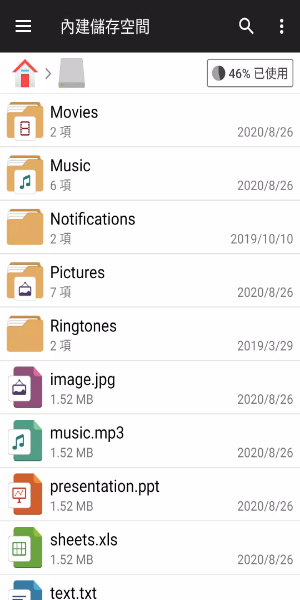
File Manager Plus is your ultimate tool for browsing files and folders on any Android device. It lets you open, search, move through directories, copy, paste, cut, delete, rename, compress, extract, transfer, download, bookmark, and organize files of all types—from media to APK files—with ease.
Unified Storage Control:
Effortlessly manage content across your main storage, SD card, and USB OTG. Downloads, new files, images, audio, videos, and documents are sorted into clear categories for quick access. You can even view and manage all apps installed on your device right inside the app.
Cloud and Remote File Access:
Connect to leading cloud services like Google Drive™, OneDrive, Dropbox, Box, and Yandex, as well as remote storage such as NAS devices and FTP servers. File Manager Plus also supports accessing your Android storage from a PC via FTP, so you can transfer files smoothly between devices.
Storage Analysis and Optimization
Scan your local storage to find and delete unnecessary files, helping you free up space. Quickly see which files and apps are using the most storage and take action to keep your device running smoothly.
Handy Built-in Utilities
Built-in Media Tools:
View images, play music, and edit text files directly in File Manager Plus. These integrated tools offer fast, hassle-free handling of media and documents wherever you are.
Archive Support:
Create and extract compressed files smoothly. The app supports creating zip archives and extracting files from zip, gz, xz, and tar formats for total archive control.
Compatible with All Your Android Devices:
Built for Android TV, phones, and tablets, File Manager Plus works the same way across devices. Enjoy a dependable file management experience, no matter what Android device you use.
Designed for Easy Use
Simple and Intuitive Interface:
File Manager Plus features a straightforward yet powerful interface that’s easy for everyone to use. Navigate quickly and access all major file operations without a learning curve.
Free with No Strings Attached:
File Manager Plus is completely free—no hidden fees or in-app purchases. All features are available from the moment you install it, delivering a full file management experience with nothing held back.
Stay Organized with Security:
Manage files and folders in a secure setting. File Manager Plus keeps your data safe while offering reliable and efficient file operations for peace of mind.
Get File Manager Plus now and manage your files with greater control. Enjoy smooth, efficient file handling across every device you own.