Home News Marvel Rivals: Block and Mute Enhanced for Optimal Gameplay

Marvel Rivals: Block and Mute Enhanced for Optimal Gameplay

Author : Brooklyn Dec 30,2024

Quick Navigation

Marvel Rivals offers a fresh take on the hero shooter genre, setting itself apart from titles like Overwatch despite sharing some similarities. While the game launched successfully, some players have encountered frustrating issues, particularly unwanted communication from other players. This guide explains how to block and mute players in Marvel Rivals, helping you create a more enjoyable gaming experience.


How to Block Players in Marvel Rivals
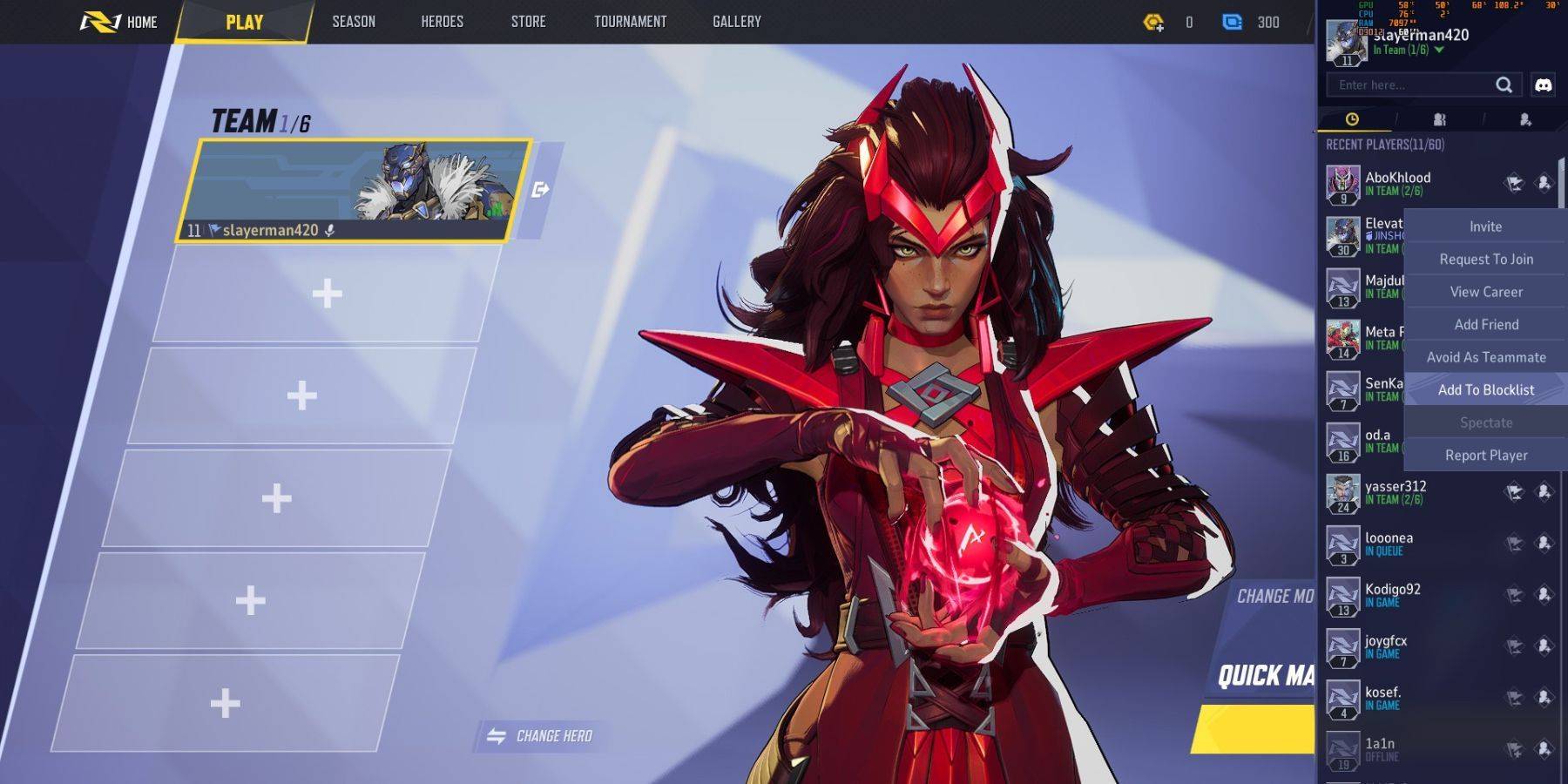
Encountering uncooperative or disruptive players is unfortunately a possibility in online games. Blocking a player in Marvel Rivals prevents you from being matched with them in future games. Here's how:

  1. Navigate to the Marvel Rivals main menu.
  2. Go to the Friends list.
  3. Select "Recent Players."
  4. Find the player you wish to block and select their profile.
  5. Choose the option to "Avoid as Teammate" or "Add to Blocklist."

Latest Articles
  • Wuchang: Dev Addresses 'Fall Feathers' Performance Problems

    ​UPDATE: Earlier today, July 28, the developer of *Wuchang: Fallen Feathers*, Leenzee, issued an updated statement via Steam. In it, the developer offered a further apology for the game’s launch issues and promised a forthcoming, "comprehensive explan

    by Zachary Dec 20,2025

  • Amazon's Prime Day PS5 DualSense Edge Drops to $122

    ​The premium Sony PlayStation 5 DualSense Edge wireless controller seldom sees discounts from its standard $200 price point. Luckily, Amazon Prime Day brings an exceptional offer - score a 'Used Like New' version for just $122.27 after checkout discou

    by Patrick Dec 19,2025

Latest Games
Shape Rhythm

Music  /  1.09  /  65.91MB

Download
Hnefatafl

Board  /  3.91  /  95.0 MB

Download
Ultimate Robot Merge

Action  /  0.3.9  /  34MB

Download