Mecha Break puts fast-paced mech combat at the forefront, but before you even step into a cockpit, the game greets you with one of the most sophisticated character creation systems available in any free-to-play shooter. Pair that with a lineup of customizable Strikers, and you have an action-packed experience blending style and strategy from the outset.
How does character creation work in Mecha Break?
Mecha Break’s pilot creator offers an impressive level of detail, comparable to games like The Sims or Cyberpunk, even though your pilot is rarely seen during gameplay. You start with a base model and can freely adjust almost every physical feature. Using sliders, you can fine-tune skin tone, face shape, eyelid angle, eyebrow thickness, nose structure, lip fullness, and even minute details like finger length to craft your ideal character.
You also have control over hair—including color, style, fringe options, and length—alongside makeup settings such as contouring, eyeliner, eyeshadow, lipstick, and blush. Body modifications let you adjust height, build, and proportions, while even subtle traits like skin texture can be customized. By playing the game and earning Mission Tokens, you unlock alternate body suit colors, while premium purchases or seasonal events grant access to outfits and tattoos.
Customize your Striker for any occasion. pic.twitter.com/5mcMhkzZE4
— Mecha BREAK (@MechaBREAK) April 18, 2025
Whether your preference is a stylized anime aesthetic or a lifelike pilot design, this system puts complete creative freedom in your hands.
Is it possible to change your pilot after creation?
You can, but with certain limitations. You’re free to return to the Pilot menu at any time and use the “Edit” option to modify your pilot’s appearance. Most facial, body, and makeup options remain free to adjust. However, unlocking a second preset slot requires 2,000 Mission Tokens, and switching to a different gender or base model will cost 680 Corite, the game’s premium currency.
Additionally, premium outfits are often locked behind paywalls or limited-time events, so it’s wise to think carefully when first designing your pilot if visual variety is important to you. Fortunately, completing the Ace Conquest introductory event rewards you with a handful of free cosmetics, such as a beret or uniform.
In short: you can freely update your appearance, but switching to a new preset or model may demand gameplay effort or real money.
Does your character choice affect gameplay?
No. All pilot customization is purely cosmetic and does not change combat performance, attributes, or abilities. Since you’ll spend most matches inside your Striker, the mechs themselves are where the real action takes place.
What are Strikers in Mecha Break and how do they function?
Strikers are the heart of Mecha Break’s combat experience. These massive battle machines are what players control during matches, with each Striker fulfilling a specific role and offering unique strengths. Playstyles vary widely, from support and defense to close-range brawling and long-distance sniping.
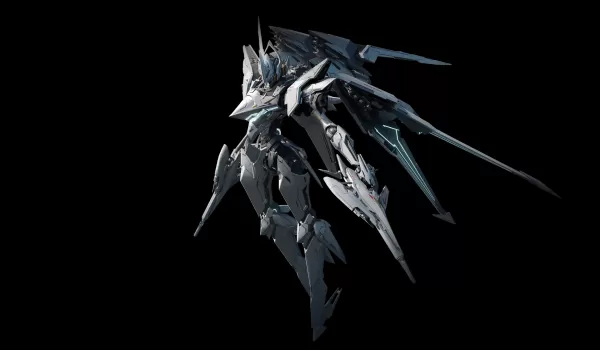
Whether you’re sculpting your pilot to perfection or mastering your chosen Striker, Mecha Break emphasizes personalization and strategic play. Every adjustment, whether visual or mechanical, helps showcase your individual approach to the game.
To get the most out of your sessions—including enhanced graphics, intuitive controls, customizable layouts, and support for multiple accounts—play Mecha Break on PC with BlueStacks. BlueStacks boosts your experience with features like key remapping, multi-instance functionality, and graphics optimization, giving you a competitive advantage while aligning with your preferred mech role.
Climb into the cockpit, personalize your warrior, and lead your Striker to victory on PC with BlueStacks!
Continue advancing in Mecha BREAK with our additional guides:
How to Play Mecha BREAK on PC with BlueStacksMecha BREAK Redeem Codes and How to Use Them Properly