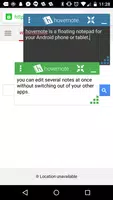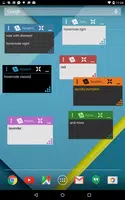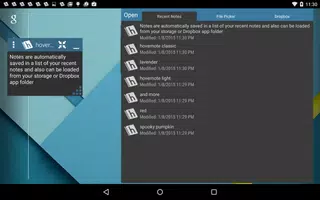
Hovernote is a versatile note-taking and organization app designed to streamline your productivity. With its intuitive interface, Hovernote enables users to create, edit, and manage notes effortlessly. Enhance your notes with tags, images, and links to make studying, brainstorming, and project management more effective. The app is tailored to provide a seamless experience, ensuring you can focus on what matters most.
Features of Hovernote:
Floating Notepad Feature: Experience true multitasking on Android with Hovernote's innovative floating notepad, allowing you to take notes while using other apps seamlessly.
Customizable Themes: Personalize your notes with a variety of themes to match your style and preferences.
Effortless Sharing: Share your notes easily with other applications such as Dropbox and Evernote, ensuring your data is always accessible.
Autosave Functionality: Never lose your work with Hovernote's autosave feature, which keeps track of your recent notes automatically.
Android Wear Compatibility: Quickly create notes on the go with Hovernote's support for Android Wear devices.
Extensive Customization Options: Tailor your note-taking experience with options for window transparency, font style, and more, to suit your needs perfectly.
Conclusion:
Hovernote's innovative floating notepad and customizable themes revolutionize multitasking on Android devices. The autosave feature and seamless sharing capabilities simplify organizing and accessing your notes. With Android Wear support and a wide range of customization options, Hovernote is an essential tool for anyone looking to boost their note-taking and productivity. Experience the power of true multitasking by downloading Hovernote today!
What's New in the Latest Version 3.1
Last updated on Jun 13, 2018
Dropbox Support Removed: We've removed broken Dropbox support to prevent crashes when opening the app with Dropbox connected. Special thanks to Misha and Andrei for reporting this issue.
Note Export Added: You can now export all your notes from the settings, allowing you to save and move them off your device for added flexibility.