Introducing WiFi Password Key Show: Your Ultimate WiFi Password Manager
Tired of forgetting your WiFi passwords? Introducing WiFi Password Key Show, the ultimate app for WiFi password recovery and management. With this app, you can easily view and copy all the saved WiFi passwords for the networks you've connected to on your Android device.
WiFi Password Key Show is a simple and free WiFi password viewer, reader, and key finder. You can also share your WiFi passwords with friends for free. Additionally, the app features WiFi signal strength analysis and network frequency information.
This app is completely free and does not use or share any personal information. Please note that WiFi Password Key Show requires root access to recover passwords and is not a hacking app.
Features of this App:
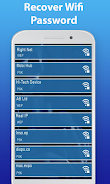
- WiFi Password Recovery: This app allows you to view and recover all the saved WiFi passwords for WiFi networks that your Android device has previously connected to.
- WiFi Password Backup: WiFi Password Key Show can manage and backup all your connected WiFi passwords on your phone.
- WiFi Password Sharing: You can copy and share the saved WiFi passwords stored in this app with your friends.
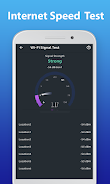
- WiFi Signal Strength Analysis: This app also has a WiFi signal strength function which allows you to analyze the WiFi network SSID and signal strength.
- Easy to Use: WiFi Password Key Show is a simple and free WiFi password viewer, reader, finder, and master key app.
- Secure and Privacy-Focused: This app does not use or share any user personal information with any third party. It also requires root access to recover WiFi passwords.
In conclusion, WiFi Password Key Show is a convenient and useful app for recovering and managing WiFi passwords. Its various features, such as password recovery, backup, sharing, and signal strength analysis, make it a must-have for Android users who want quick access to their WiFi passwords. The app is easy to use and provides a secure and privacy-focused experience. Click to download the app and make managing your WiFi passwords easier than ever before.